Text-to-Video: Create AI Videos with Just a Prompt
Imagine typing a sentence and watching it come to life as a video. That's exactly what text-to-video AI does.
You describe a scene in plain language, and artificial intelligence transforms your words into a fully rendered video — complete with motion, lighting, and sometimes even sound. No cameras. No actors. No editing software. Just your words and a few seconds of waiting.
This guide walks you through how text-to-video works and how to start creating videos today.
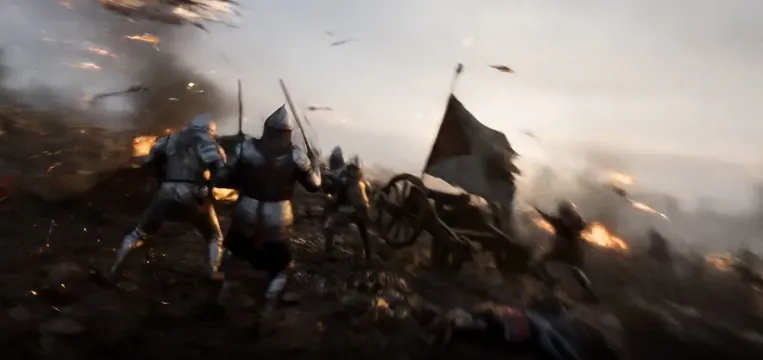
What is Text-to-Video?
Text-to-video is a type of AI technology that generates videos from written descriptions. You type a prompt describing what you want to see, and the AI model creates a video based on that description.
For example, you might type:
"A golden retriever running through a sunlit meadow at sunset, cinematic camera movement"
Within seconds, the AI generates a video showing exactly that scene — a dog running through a beautiful field with warm golden light and smooth camera work.
The technology has improved dramatically in recent years. Modern AI models can create realistic human motion, complex environments, detailed lighting, and even synchronized audio.
How Does Text-to-Video Work?
The process is surprisingly simple:
Step 1: Write a Prompt
A prompt is just a description of the video you want. Write it like you're telling someone what to film.
Good prompts include:
- Subject: What's happening? (a person walking, a car driving, waves crashing)
- Environment: Where is it? (a city street, a forest, a modern office)
- Lighting: What's the mood? (sunset, neon lights, soft daylight)
- Camera: How should it move? (slow push-in, tracking shot, overhead view)
- Style: What's the feel? (cinematic, realistic, artistic)
Example prompts:
"Close-up of steam rising from a coffee cup on a rainy morning, shallow depth of field, cozy atmosphere"
"Drone shot flying over snowy mountains at golden hour, epic scale, cinematic quality"
"A child playing with blocks in a bright living room, natural light from windows, warm and happy mood"
Step 2: Choose Your Settings
Before generating, you select a few options:
- Aspect Ratio: 16:9 for widescreen, 9:16 for vertical (TikTok/Reels), 1:1 for square
- Duration: How long the video should be (varies by model)
- Resolution: Quality level (720p, 1080p, or 4K)
- Audio: Whether to include sound
Step 3: Generate
Click the generate button and wait. Most videos are ready in under a minute. The AI processes your prompt and creates a video that matches your description.
Step 4: Download
Once generated, your video is ready to download and use wherever you need it.
Why Text-to-Video is a Game Changer
No Equipment Needed
Traditional video production requires cameras, lighting, microphones, and editing software. Text-to-video needs only a text prompt and an internet connection.
No Technical Skills Required
You don't need to learn video editing, animation, or cinematography. If you can write a sentence, you can create a video.
Incredible Speed
A video that would take hours to film and edit can be generated in seconds. This speed lets you experiment freely and try different ideas quickly.
Low Cost
Professional video production costs hundreds or thousands of dollars per minute. AI video generation costs a few cents per clip.
Infinite Creativity
Want to show a dragon flying over a futuristic city? A time-lapse of a flower blooming on Mars? A product floating in space? Text-to-video makes the impossible possible.
Tips for Better Text-to-Video Results
Be Specific
Vague prompts produce vague results. Instead of "a person walking," try "a woman in a red coat walking through a busy train station, morning light, cinematic depth of field."
Describe the Camera
Camera movement makes videos feel professional. Include terms like:
- Slow push-in (camera moves toward the subject)
- Tracking shot (camera follows the action)
- Overhead view (camera looks down from above)
- Pan left/right (camera rotates horizontally)
- Handheld (slight camera shake for realism)
Mention the Lighting
Lighting sets the mood. Try descriptions like:
- Golden hour (warm sunset light)
- Neon-lit (colorful artificial light)
- Soft daylight (gentle natural light)
- Dramatic shadows (high contrast)
- Moody and dark (low-key lighting)
Start Simple
Begin with straightforward prompts and gradually add more detail as you get comfortable. Complex scenes with multiple elements can be challenging for AI models.
Iterate
Your first generation might not be perfect. Refine your prompt, adjust settings, and try again. Each attempt teaches you how the AI interprets your words.
Common Text-to-Video Use Cases
Social Media Content
Create eye-catching videos for TikTok, Instagram Reels, and YouTube Shorts. Generate multiple variations quickly to find what resonates with your audience.
Product Videos
Turn product descriptions into visual content. Show your product in different environments, from different angles, with various lighting conditions.
Storytelling
Bring stories to life with AI-generated scenes. Create short films, animated sequences, or visual narratives from written scripts.
Marketing
Produce ad creatives, brand content, and promotional videos without traditional production costs. Test different messages and visuals rapidly.
Education
Generate educational content that explains concepts visually. Create tutorials, explainer videos, and training materials with engaging visuals.
Getting Started with Text-to-Video
Ready to try text-to-video? The fastest way to start is to sign up for a free account on XYZ Generator, pick a model, write a simple prompt, and press generate.
For a complete step-by-step walkthrough — choosing the right model, configuring settings, and downloading your finished video — follow our tutorial on how to Create an AI Video from Text.
The first time you see your text transform into a moving image, you'll understand why text-to-video is revolutionizing content creation.
Start Creating Today
Text-to-video technology has made video creation accessible to everyone. No expensive equipment, no technical expertise, no long production timelines. Just your imagination and a few words.
The possibilities are endless, and the technology keeps improving. Start experimenting with text-to-video today and discover how easy it is to bring your ideas to life.
🎬 Try Text-to-Video Now — Create your first AI video with XYZ Generator.
Tags: AI, Text-to-Video, Beginner Guide, Video Generation, Tutorial
Article loaded